library(tidyverse)
library(emmeans)

set.seed(331)Field guide to generalized linear models
Generalized linear models in R, step by step, with one mock sociable-weaver dataset. For the Kalahari Field Course.
This guide was prepared for the Kalahari Field Course (EEE331) of the University of Zurich.
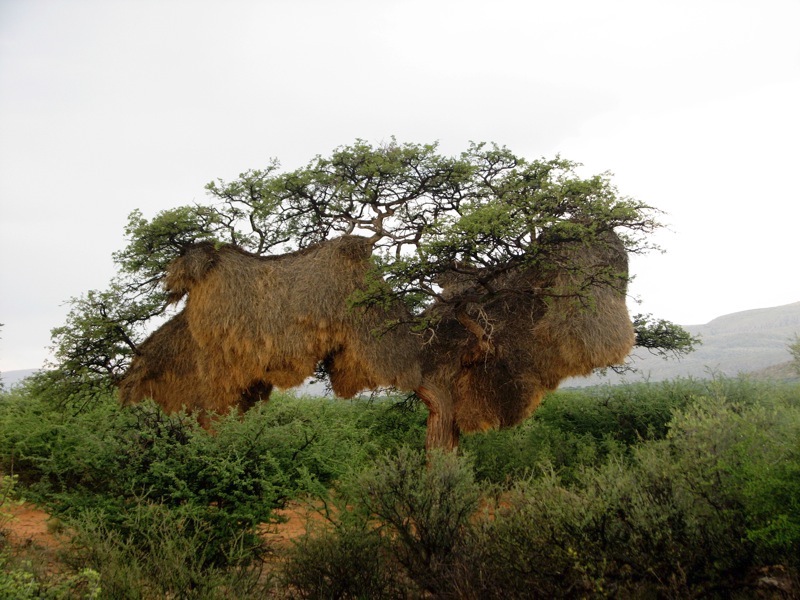
Our mock dataset
Here you will analyse one mock sociable-weaver dataset in lots of different ways.
For each tree we record:
TreeType: Camelthorn or Shepherd’s treeNestHeight: height of the communal nest above the groundNestSize: Small, Medium or LargeTemperature: temperature measured at the nestPredator: whether a pygmy falcon was present (0 = absent,1 = present)NestChambers: number of individual nesting chambers in the communal nest
The data are simulated for teaching. I have deliberately built clear effects into them so that we can concentrate on understanding the models.
n_per_group <- 40

weaver <- expand_grid(
  TreeType = c("Camelthorn", "Shepherd"),
  NestSize = c("Small", "Medium", "Large"),
  Replicate = 1:n_per_group
) %>%
  mutate(
    Tree = row_number(),
    TreeType = factor(TreeType),
    NestSize = factor(NestSize,
                      levels = c("Small", "Medium", "Large")),

    # Continuous explanatory variable
    NestHeight = runif(n(), 2, 7),

    # CONTINUOUS RESPONSE
    # Effects of height, tree type and nest size,
    # plus two interactions that we will test later.
    # The NestSize x TreeType interaction is deliberately strong
    # and criss-crossing to make the idea of an interaction obvious.
    Temperature =
      24 +
      0.9 * NestHeight +
      5.5 * (TreeType == "Shepherd") +
      4.0 * (NestSize == "Medium") +
      10.0 * (NestSize == "Large") -
      6.0 * (TreeType == "Shepherd" & NestSize == "Medium") -
      14.0 * (TreeType == "Shepherd" & NestSize == "Large") +
      1.0 * NestHeight * (TreeType == "Shepherd") +
      rnorm(n(), 0, 1),

    # BINARY RESPONSE
    # Pygmy falcon presence depends on height and tree type
    prob_predator = plogis(
      -4.4 +
      0.65 * NestHeight +
      1.25 * (TreeType == "Shepherd")
    ),
    Predator = rbinom(n(), 1, prob_predator),

    # COUNT RESPONSE
    # Number of individual chambers depends on nest size,
    # height and tree type
    expected_chambers = exp(
      2.9 +
      0.10 * NestHeight +
      0.22 * (TreeType == "Shepherd") +
      0.25 * (NestSize == "Medium") +
      0.55 * (NestSize == "Large")
    ),
    NestChambers = rpois(n(), expected_chambers)
  ) %>%
  select(-Replicate, -prob_predator, -expected_chambers)

weaver
# A tibble: 240 x 7
TreeType NestSize Tree NestHeight Temperature Predator NestChambers
<fct> <fct> <int> <dbl> <dbl> <int> <int>
1 Camelthorn Small 1 6.89 28.8 0 35
2 Camelthorn Small 2 6.65 29.7 1 31
3 Camelthorn Small 3 5.11 28.7 0 30
4 Camelthorn Small 4 4.57 28.6 1 29
5 Camelthorn Small 5 2.64 26.7 1 19
6 Camelthorn Small 6 2.69 27.0 0 22
7 Camelthorn Small 7 6.14 28.1 0 30
8 Camelthorn Small 8 2.31 26.8 0 16
9 Camelthorn Small 9 6.02 28.1 0 35
10 Camelthorn Small 10 4.06 26.3 0 21
# i 230 more rowsFirst, let’s make sure the columns have the right type
R needs to know what kind of variable each column represents.
For this practical, keep it simple:
| Variable type | Example | R type |
|---|---|---|
| Categorical | TreeType, NestSize |
factor |
| Binary response | Predator coded 0/1 |
numeric 0/1 |
| Continuous | Temperature, NestHeight |
numeric |
| Counts | NestChambers |
non-negative whole numbers |
You can check this with:
glimpse(weaver)Rows: 240
Columns: 7
$ TreeType <fct> Camelthorn, Camelthorn, Camelthorn, Camelthorn, Camelthor~
$ NestSize <fct> Small, Small, Small, Small, Small, Small, Small, Small, S~
$ Tree <int> 1, 2, 3, 4, 5, 6, 7, 8, 9, 10, 11, 12, 13, 14, 15, 16, 17~
$ NestHeight <dbl> 6.889650, 6.653363, 5.111768, 4.565232, 2.637354, 2.68553~
$ Temperature <dbl> 28.79139, 29.69090, 28.71978, 28.58121, 26.68152, 26.9997~
$ Predator <int> 0, 1, 0, 1, 1, 0, 0, 0, 0, 0, 0, 0, 0, 0, 0, 1, 1, 0, 0, ~
$ NestChambers <int> 35, 31, 30, 29, 19, 22, 30, 16, 35, 21, 23, 29, 29, 21, 1~A common mistake is to leave a categorical variable as numbers such as 1, 2, 3. R may then treat it as continuous. If the numbers are really group labels, convert them to a factor:
weaver$NestSize <- factor(weaver$NestSize)Before we start: parametric and non-parametric tests
There are two broad traditions you have probably encountered.
Parametric tests assume that the response follows some probability distribution. For example:
- Normal (Gaussian) for a continuous response
- Binomial for a
0/1response - Poisson for counts
These are the models we focus on here.
Non-parametric tests, such as Wilcoxon and Kruskal-Wallis, mainly use the ranks of observations instead of modelling the response directly. They can be useful, but they are much less flexible when you want several predictors, interactions or random effects.
We will come back to them briefly at the end.
The idea: One model to unite them all
The goal of this practical is not to learn lots of different statistical tests.
The goal is to realise that most of the methods you already know are simply different versions of one statistical model.
Everything starts from the same formula:
Response ~ Predictorsor, in R:
glm(
  Response ~ Predictors,
  family = ...
)
As we go through the practical, notice what changes—and, more importantly, what doesn’t.
There are only three questions to ask:
- What is my response variable?
- What explanatory variables do I have?
- Are my observations independent?
Everything else follows naturally.
Throughout the first half of this practical we will keep the response variable exactly the same (Temperature) and only change the explanatory variables.
| Formula | Classical name |
|---|---|
Temperature ~ NestHeight |
Linear regression |
Temperature ~ TreeType |
t-test |
Temperature ~ NestSize |
One-way ANOVA |
Temperature ~ TreeType + NestSize + TreeType:NestSize |
Two-way ANOVA |
Temperature ~ NestHeight + TreeType + NestHeight:TreeType |
ANCOVA |
Notice that the response never changes—only the predictors.
Only later will we change the response (to a binary or count variable). The model stays exactly the same; only the family changes.
1. Continuous response + continuous explanatory variable
Biological question
Does nest temperature change with nest height?
Response:     Temperature   -> continuous
Explanatory:  NestHeight    -> continuous
First, look at the data:
ggplot(weaver, aes(NestHeight, Temperature)) +
  geom_point() +
  geom_smooth(method = "lm")
`geom_smooth()` using formula = 'y ~ x'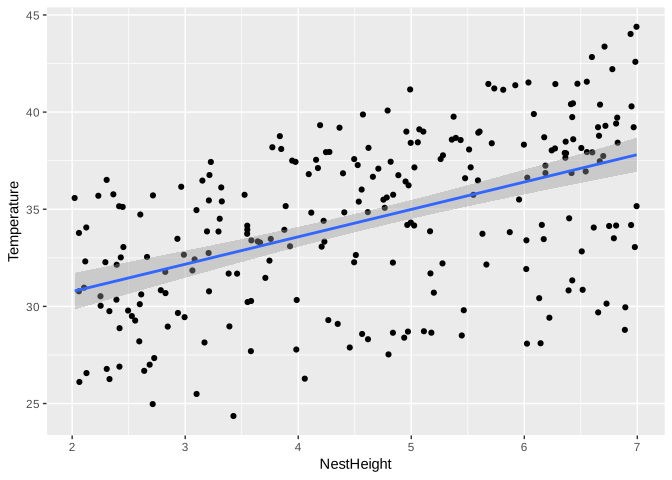
Classical name: linear regression
The familiar classical approach is:
m_reg <- lm(
  Temperature ~ NestHeight,
  data = weaver
)

summary(m_reg)
Call:
lm(formula = Temperature ~ NestHeight, data = weaver)
Residuals:
Min 1Q Median 3Q Max
-8.8655 -2.6615 0.7094 2.9638 6.5915
Coefficients:
Estimate Std. Error t value Pr(>|t|)
(Intercept) 27.939 0.775 36.052 <2e-16 ***
NestHeight 1.411 0.159 8.872 <2e-16 ***
---
Signif. codes: 0 '***' 0.001 '**' 0.01 '*' 0.05 '.' 0.1 ' ' 1
Residual standard error: 3.715 on 238 degrees of freedom
Multiple R-squared: 0.2485, Adjusted R-squared: 0.2454
F-statistic: 78.72 on 1 and 238 DF, p-value: < 2.2e-16The GLM way
The same model can be written as a Gaussian GLM:
m_reg_glm <- glm(
  Temperature ~ NestHeight,
  family = gaussian,
  data = weaver
)

summary(m_reg_glm)
Call:
glm(formula = Temperature ~ NestHeight, family = gaussian, data = weaver)
Coefficients:
Estimate Std. Error t value Pr(>|t|)
(Intercept) 27.939 0.775 36.052 <2e-16 ***
NestHeight 1.411 0.159 8.872 <2e-16 ***
---
Signif. codes: 0 '***' 0.001 '**' 0.01 '*' 0.05 '.' 0.1 ' ' 1
(Dispersion parameter for gaussian family taken to be 13.80266)
Null deviance: 4371.6 on 239 degrees of freedom
Residual deviance: 3285.0 on 238 degrees of freedom
AIC: 1315
Number of Fisher Scoring iterations: 2Compare the coefficients:
coef(m_reg)(Intercept) NestHeight
27.93874 1.41054 coef(m_reg_glm)(Intercept) NestHeight
27.93874 1.41054 These are two ways of fitting the same Gaussian linear model. lm() uses ordinary least squares, whereas glm(..., family = gaussian) uses the more general GLM fitting machinery. Here they give the same coefficient estimates.
Linear regression is a Gaussian GLM with a continuous predictor.
2. Continuous response + a categorical variable with TWO levels
Biological question
Does nest temperature differ between Camelthorn and Shepherd’s trees?
Response:     Temperature  -> continuous
Explanatory:  TreeType     -> categorical, 2 levels
First, look at the data:
ggplot(weaver, aes(TreeType, Temperature)) +
  geom_boxplot()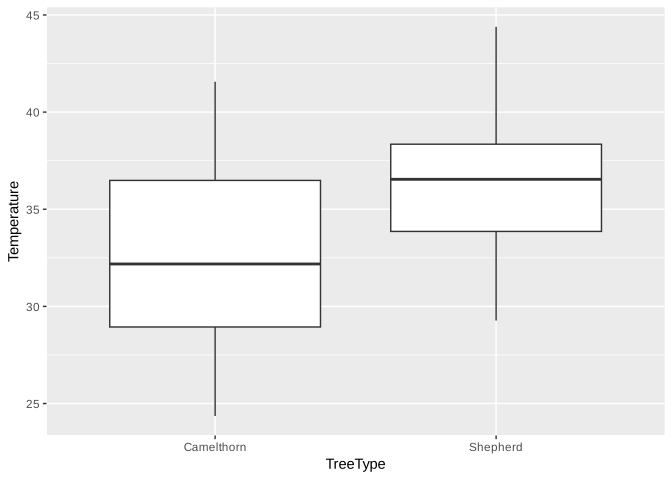
Classical name: two-sample t-test
t.test(
  Temperature ~ TreeType,
  data = weaver,
  var.equal = TRUE
)
Two Sample t-test
data: Temperature by TreeType
t = -7.0108, df = 238, p-value = 2.43e-11
alternative hypothesis: true difference in means between group Camelthorn and group Shepherd is not equal to 0
95 percent confidence interval:
-4.523795 -2.539161
sample estimates:
mean in group Camelthorn mean in group Shepherd
32.71133 36.24281 The GLM way
m_ttest <- glm(
  Temperature ~ TreeType,
  family = gaussian,
  data = weaver
)

summary(m_ttest)
Call:
glm(formula = Temperature ~ TreeType, family = gaussian, data = weaver)
Coefficients:
Estimate Std. Error t value Pr(>|t|)
(Intercept) 32.7113 0.3562 91.839 < 2e-16 ***
TreeTypeShepherd 3.5315 0.5037 7.011 2.43e-11 ***
---
Signif. codes: 0 '***' 0.001 '**' 0.01 '*' 0.05 '.' 0.1 ' ' 1
(Dispersion parameter for gaussian family taken to be 15.22397)
Null deviance: 4371.6 on 239 degrees of freedom
Residual deviance: 3623.3 on 238 degrees of freedom
AIC: 1338.6
Number of Fisher Scoring iterations: 2The classical equal-variance t-test and the Gaussian GLM are testing the same difference between two group means.
A t-test is a Gaussian GLM with a two-level categorical predictor.
3. Continuous response + a categorical variable with MORE than two levels
Biological question
Does nest temperature differ among Small, Medium and Large nests?
Response:     Temperature  -> continuous
Explanatory:  NestSize     -> categorical, 3 levels
First, look at the data:
ggplot(weaver, aes(NestSize, Temperature)) +
  geom_boxplot()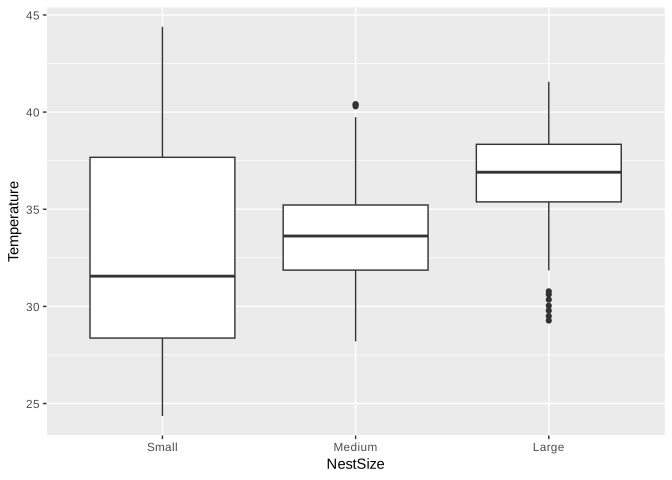
Classical name: one-way ANOVA
m_aov <- aov(
  Temperature ~ NestSize,
  data = weaver
)

summary(m_aov)
Df Sum Sq Mean Sq F value Pr(>F)
NestSize 2 485 242.6 14.79 8.83e-07 ***
Residuals 237 3886 16.4
---
Signif. codes: 0 '***' 0.001 '**' 0.01 '*' 0.05 '.' 0.1 ' ' 1The GLM way
m_anova <- glm(
  Temperature ~ NestSize,
  family = gaussian,
  data = weaver
)

summary(m_anova)
Call:
glm(formula = Temperature ~ NestSize, family = gaussian, data = weaver)
Coefficients:
Estimate Std. Error t value Pr(>|t|)
(Intercept) 33.1562 0.4527 73.233 < 2e-16 ***
NestSizeMedium 0.6683 0.6403 1.044 0.298
NestSizeLarge 3.2942 0.6403 5.145 5.61e-07 ***
---
Signif. codes: 0 '***' 0.001 '**' 0.01 '*' 0.05 '.' 0.1 ' ' 1
(Dispersion parameter for gaussian family taken to be 16.39838)
Null deviance: 4371.6 on 239 degrees of freedom
Residual deviance: 3886.4 on 237 degrees of freedom
AIC: 1357.4
Number of Fisher Scoring iterations: 2ANOVA is a Gaussian GLM with a categorical predictor.
If the overall effect is supported, we may also want to ask which levels differ from one another. We will come back to post-hoc comparisons in Section 8.
4. Two categorical predictors and an interaction
Biological question
Does the effect of nest size on temperature differ between Camelthorn and Shepherd’s trees?
Response:      Temperature
Explanatory 1: TreeType   -> categorical
Explanatory 2: NestSize   -> categorical
Interaction:   TreeType:NestSize
First, look at the data:
ggplot(weaver,
       aes(NestSize, Temperature,
           colour = TreeType,
           group = TreeType)) +
  stat_summary(fun = mean, geom = "line") +
  stat_summary(fun = mean, geom = "point") +
  stat_summary(fun.data = mean_cl_normal,
               geom = "errorbar",
               width = 0.1)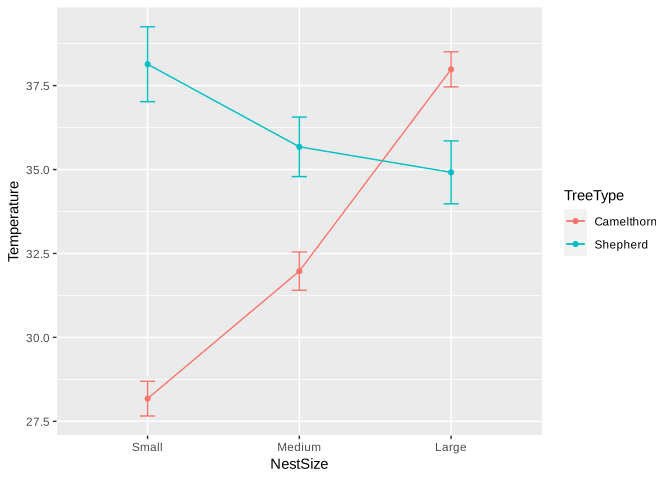
Here the lines actually cross: temperature increases with nest size in one tree type but decreases in the other. This is an especially clear example of an interaction.
In real data, interactions do not have to cross. Any clear departure from parallel patterns can indicate that the effect of one predictor depends on the other.
Classical name: two-way ANOVA with an interaction
The GLM way
m_anova_int <- glm(
  Temperature ~ TreeType + NestSize + TreeType:NestSize,
  family = gaussian,
  data = weaver
)

summary(m_anova_int)
Call:
glm(formula = Temperature ~ TreeType + NestSize + TreeType:NestSize,
family = gaussian, data = weaver)
Coefficients:
Estimate Std. Error t value Pr(>|t|)
(Intercept) 28.1757 0.3922 71.847 < 2e-16 ***
TreeTypeShepherd 9.9611 0.5546 17.961 < 2e-16 ***
NestSizeMedium 3.7978 0.5546 6.848 6.54e-11 ***
NestSizeLarge 9.8092 0.5546 17.687 < 2e-16 ***
TreeTypeShepherd:NestSizeMedium -6.2590 0.7843 -7.980 6.52e-14 ***
TreeTypeShepherd:NestSizeLarge -13.0299 0.7843 -16.613 < 2e-16 ***
---
Signif. codes: 0 '***' 0.001 '**' 0.01 '*' 0.05 '.' 0.1 ' ' 1
(Dispersion parameter for gaussian family taken to be 6.151587)
Null deviance: 4371.6 on 239 degrees of freedom
Residual deviance: 1439.5 on 234 degrees of freedom
AIC: 1125
Number of Fisher Scoring iterations: 2The interaction is written explicitly as:
TreeType:NestSizeSo the model contains the effects of TreeType, NestSize, and their interaction.
5. Continuous + categorical predictors
Biological question
Does temperature change with nest height, and is that relationship different between tree types?
Response:      Temperature  -> continuous
Explanatory 1: NestHeight   -> continuous
Explanatory 2: TreeType     -> categorical
Interaction:   NestHeight:TreeType
First, look at the data:
ggplot(weaver,
       aes(NestHeight, Temperature,
           colour = TreeType)) +
  geom_point() +
  geom_smooth(method = "lm")
`geom_smooth()` using formula = 'y ~ x'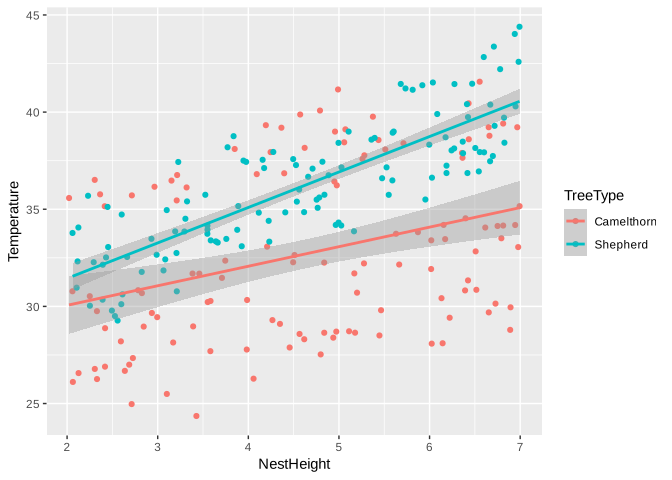
Here we can already ask whether the slopes look different between tree types.
Classical name: ANCOVA
The GLM way
m_ancova <- glm(
  Temperature ~ NestHeight + TreeType + NestHeight:TreeType,
  family = gaussian,
  data = weaver
)

summary(m_ancova)
Call:
glm(formula = Temperature ~ NestHeight + TreeType + NestHeight:TreeType,
family = gaussian, data = weaver)
Coefficients:
Estimate Std. Error t value Pr(>|t|)
(Intercept) 28.0444 0.9479 29.585 < 2e-16 ***
NestHeight 1.0058 0.1943 5.178 4.81e-07 ***
TreeTypeShepherd -0.2543 1.3412 -0.190 0.84979
NestHeight:TreeTypeShepherd 0.8197 0.2751 2.979 0.00319 **
---
Signif. codes: 0 '***' 0.001 '**' 0.01 '*' 0.05 '.' 0.1 ' ' 1
(Dispersion parameter for gaussian family taken to be 10.33563)
Null deviance: 4371.6 on 239 degrees of freedom
Residual deviance: 2439.2 on 236 degrees of freedom
AIC: 1247.6
Number of Fisher Scoring iterations: 2Nothing fundamentally new has happened. This is simply a Gaussian GLM containing a continuous predictor, a categorical predictor, and an interaction.
Regression, t-test, ANOVA and ANCOVA are all versions of the same GLM framework.
6. Binary response: 0 or 1
Biological question
Is pygmy falcon presence related to tree type?
Our response is:
Predator = 0   pygmy falcon absent
Predator = 1   pygmy falcon present
Response: Predator -> binary, 0/1
Explanatory: TreeType -> categoricalFirst, look at the data. For a binary response, it is useful to plot the proportion of trees with a predator:
predator_plot <- weaver %>%
  group_by(TreeType) %>%
  summarise(
    p = mean(Predator),
    se = sqrt(p * (1 - p) / n())
  )

ggplot(predator_plot, aes(TreeType, p)) +
  geom_point() +
  geom_errorbar(
    aes(ymin = p - 1.96 * se,
        ymax = p + 1.96 * se),
    width = 0.1
  ) +
  ylim(0, 1)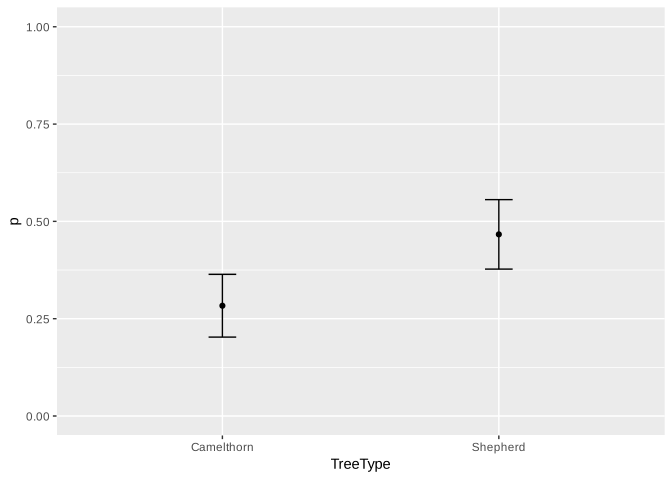
Classical name: logistic regression
You may also be familiar with analysing two categorical variables using a contingency table and a chi-square test. Here we use logistic regression because it extends naturally to additional predictors and interactions.
The GLM way
Because the response is 0/1, we use a binomial GLM:
m_binom <- glm(
  Predator ~ TreeType,
  family = binomial,
  data = weaver
)

summary(m_binom)
Call:
glm(formula = Predator ~ TreeType, family = binomial, data = weaver)
Coefficients:
Estimate Std. Error z value Pr(>|z|)
(Intercept) -0.9280 0.2026 -4.581 4.63e-06 ***
TreeTypeShepherd 0.7945 0.2730 2.910 0.00361 **
---
Signif. codes: 0 '***' 0.001 '**' 0.01 '*' 0.05 '.' 0.1 ' ' 1
(Dispersion parameter for binomial family taken to be 1)
Null deviance: 317.55 on 239 degrees of freedom
Residual deviance: 308.88 on 238 degrees of freedom
AIC: 312.88
Number of Fisher Scoring iterations: 4And we can immediately extend the same model:
m_binom2 <- glm(
  Predator ~ TreeType + NestHeight,
  family = binomial,
  data = weaver
)

summary(m_binom2)
Call:
glm(formula = Predator ~ TreeType + NestHeight, family = binomial,
data = weaver)
Coefficients:
Estimate Std. Error z value Pr(>|z|)
(Intercept) -3.8304 0.5945 -6.443 1.17e-10 ***
TreeTypeShepherd 0.9378 0.2988 3.139 0.0017 **
NestHeight 0.5896 0.1067 5.523 3.33e-08 ***
---
Signif. codes: 0 '***' 0.001 '**' 0.01 '*' 0.05 '.' 0.1 ' ' 1
(Dispersion parameter for binomial family taken to be 1)
Null deviance: 317.55 on 239 degrees of freedom
Residual deviance: 272.84 on 237 degrees of freedom
AIC: 278.84
Number of Fisher Scoring iterations: 4The modelling framework has not changed. Only the response distribution has.
7. Count response
Biological question
Does the number of individual chambers differ among nest-size categories?
Our response is the number of individual nesting chambers in the communal nest:
18, 27, 41, 56, ...Response: NestChambers -> count
Explanatory: NestSize -> categoricalFirst, look at the data:
ggplot(weaver, aes(NestSize, NestChambers, fill = TreeType)) +
  geom_boxplot(position = position_dodge(width = 0.8))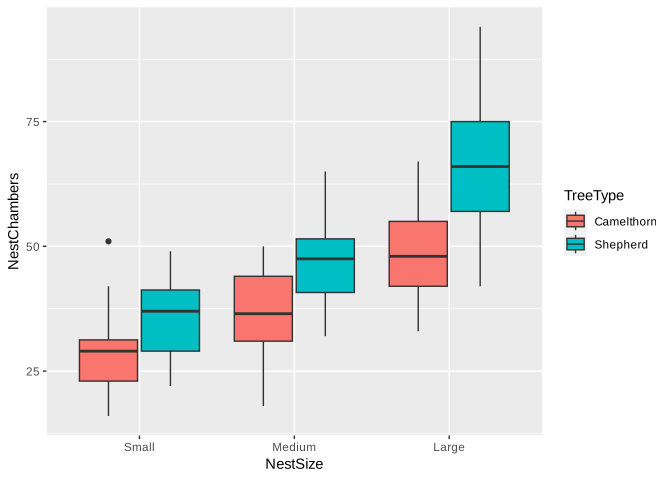
Classical name: Poisson regression
Poisson regression is the standard GLM starting point for count responses.
The GLM way
m_pois <- glm(
  NestChambers ~ NestSize,
  family = poisson,
  data = weaver
)

summary(m_pois)
Call:
glm(formula = NestChambers ~ NestSize, family = poisson, data = weaver)
Coefficients:
Estimate Std. Error z value Pr(>|z|)
(Intercept) 3.47545 0.01967 176.702 <2e-16 ***
NestSizeMedium 0.25684 0.02619 9.806 <2e-16 ***
NestSizeLarge 0.57720 0.02458 23.485 <2e-16 ***
---
Signif. codes: 0 '***' 0.001 '**' 0.01 '*' 0.05 '.' 0.1 ' ' 1
(Dispersion parameter for poisson family taken to be 1)
Null deviance: 1174.18 on 239 degrees of freedom
Residual deviance: 587.25 on 237 degrees of freedom
AIC: 1929.3
Number of Fisher Scoring iterations: 4And again, we can easily add another predictor and an interaction:
m_pois2 <- glm(
  NestChambers ~ NestSize + TreeType + NestSize:TreeType,
  family = poisson,
  data = weaver
)

summary(m_pois2)
Call:
glm(formula = NestChambers ~ NestSize + TreeType + NestSize:TreeType,
family = poisson, data = weaver)
Coefficients:
Estimate Std. Error z value Pr(>|z|)
(Intercept) 3.36988 0.02932 114.922 < 2e-16 ***
NestSizeMedium 0.24104 0.03919 6.151 7.69e-10 ***
NestSizeLarge 0.52957 0.03696 14.327 < 2e-16 ***
TreeTypeShepherd 0.20106 0.03954 5.086 3.67e-07 ***
NestSizeMedium:TreeTypeShepherd 0.02855 0.05269 0.542 0.588
NestSizeLarge:TreeTypeShepherd 0.08497 0.04950 1.717 0.086 .
---
Signif. codes: 0 '***' 0.001 '**' 0.01 '*' 0.05 '.' 0.1 ' ' 1
(Dispersion parameter for poisson family taken to be 1)
Null deviance: 1174.18 on 239 degrees of freedom
Residual deviance: 424.28 on 234 degrees of freedom
AIC: 1772.3
Number of Fisher Scoring iterations: 4There is no need to invent a new statistical test every time you add another explanatory variable.
8. Testing and reporting effects
So far we have focused on choosing and fitting the model.
Now we ask whether the effects in the model are supported by the data, and how we would report them. The basic sequence is:
Fit the model -> test the effect -> if needed, compare factor levels -> report the biological result and the statistical evidence.
A simple reporting rule for this course
For this field course, keep the Results sentence simple:
Biological result + test statistic + p-value
For example:
Nest temperature increased significantly with nest height (F = 46.27, p < 0.001).
That is enough for your field-course report.
In a scientific paper, statistical reporting is usually more complete. Depending on the analysis and journal, you would normally also report the model/test used, degrees of freedom, and often the estimated effect size and its uncertainty. For example:
Nest temperature increased with nest height (Gaussian GLM: \(\beta\) = 1.53 \(\pm\) 0.23 SE, F1,238 = 46.27, p < 0.001).
For this course, however, you do not need to report all of that.
Use the same simple convention throughout:
- Gaussian models:
F = ..., p = ... - Binomial and Poisson models:
χ² = ..., p = ... - Post-hoc comparisons: state which groups differ and give
p = ...
If R gives you a very small p-value such as 8.3e-11, report it simply as p < 0.001.
Gaussian models
For Gaussian GLMs, use an F-test:
anova(m_reg_glm, test = "F")Analysis of Deviance Table
Model: gaussian, link: identity
Response: Temperature
Terms added sequentially (first to last)
Df Deviance Resid. Df Resid. Dev F Pr(>F)
NULL 239 4371.6
NestHeight 1 1086.5 238 3285.0 78.72 < 2.2e-16 ***
---
Signif. codes: 0 '***' 0.001 '**' 0.01 '*' 0.05 '.' 0.1 ' ' 1anova(m_anova, test = "F")Analysis of Deviance Table
Model: gaussian, link: identity
Response: Temperature
Terms added sequentially (first to last)
Df Deviance Resid. Df Resid. Dev F Pr(>F)
NULL 239 4371.6
NestSize 2 485.17 237 3886.4 14.793 8.828e-07 ***
---
Signif. codes: 0 '***' 0.001 '**' 0.01 '*' 0.05 '.' 0.1 ' ' 1anova(m_anova_int, test = "F")Analysis of Deviance Table
Model: gaussian, link: identity
Response: Temperature
Terms added sequentially (first to last)
Df Deviance Resid. Df Resid. Dev F Pr(>F)
NULL 239 4371.6
TreeType 1 748.28 238 3623.3 121.640 < 2.2e-16 ***
NestSize 2 485.17 236 3138.1 39.434 1.741e-15 ***
TreeType:NestSize 2 1698.66 234 1439.5 138.067 < 2.2e-16 ***
---
Signif. codes: 0 '***' 0.001 '**' 0.01 '*' 0.05 '.' 0.1 ' ' 1anova(m_ancova, test = "F")Analysis of Deviance Table
Model: gaussian, link: identity
Response: Temperature
Terms added sequentially (first to last)
Df Deviance Resid. Df Resid. Dev F Pr(>F)
NULL 239 4371.6
NestHeight 1 1086.55 238 3285.0 105.1267 < 2.2e-16 ***
TreeType 1 754.10 237 2530.9 72.9608 1.651e-15 ***
NestHeight:TreeType 1 91.73 236 2439.2 8.8749 0.003193 **
---
Signif. codes: 0 '***' 0.001 '**' 0.01 '*' 0.05 '.' 0.1 ' ' 1For example, the first test asks whether nest height explains variation in temperature.
How would I report this?
A good Results sentence gives the biological pattern first, followed by the statistical evidence.
Nest temperature increased significantly with nest height (F = 78.72, p < 0.001).
Avoid writing only “there was a significant effect (p < 0.05)”. Tell the reader what changed and in which direction.
Categorical effects: which levels differ?
The overall ANOVA tells us whether there is evidence that the groups differ somewhere. If a factor has more than two levels, we may then want to know which levels differ.
You may already know the classical Tukey post-hoc test:
TukeyHSD(m_aov) Tukey multiple comparisons of means
95% family-wise confidence level
Fit: aov(formula = Temperature ~ NestSize, data = weaver)
$NestSize
diff lwr upr p adj
Medium-Small 0.6683336 -0.8417904 2.178458 0.5500098
Large-Small 3.2942212 1.7840972 4.804345 0.0000017
Large-Medium 2.6258876 1.1157636 4.136012 0.0001667But because we want to stay within one modelling framework, we can make the comparisons directly from our GLM using estimated marginal means:
emmeans(
  m_anova,
  pairwise ~ NestSize,
  adjust = "tukey"
)
$emmeans
NestSize emmean SE df lower.CL upper.CL
Small 33.2 0.453 237 32.3 34.0
Medium 33.8 0.453 237 32.9 34.7
Large 36.5 0.453 237 35.6 37.3
Confidence level used: 0.95
$contrasts
contrast estimate SE df t.ratio p.value
Small - Medium -0.668 0.64 237 -1.044 0.5500
Small - Large -3.294 0.64 237 -5.145 <.0001
Medium - Large -2.626 0.64 237 -4.101 0.0002
P value adjustment: tukey method for comparing a family of 3 estimates This approach also extends naturally to more complicated GLMs. For example, if there is an interaction, we can compare nest sizes within each tree type:
emmeans(
  m_anova_int,
  pairwise ~ NestSize | TreeType,
  adjust = "tukey"
)
$emmeans
TreeType = Camelthorn:
NestSize emmean SE df lower.CL upper.CL
Small 28.2 0.392 234 27.4 28.9
Medium 32.0 0.392 234 31.2 32.7
Large 38.0 0.392 234 37.2 38.8
TreeType = Shepherd:
NestSize emmean SE df lower.CL upper.CL
Small 38.1 0.392 234 37.4 38.9
Medium 35.7 0.392 234 34.9 36.4
Large 34.9 0.392 234 34.1 35.7
Confidence level used: 0.95
$contrasts
TreeType = Camelthorn:
contrast estimate SE df t.ratio p.value
Small - Medium -3.80 0.555 234 -6.848 <.0001
Small - Large -9.81 0.555 234 -17.687 <.0001
Medium - Large -6.01 0.555 234 -10.839 <.0001
TreeType = Shepherd:
contrast estimate SE df t.ratio p.value
Small - Medium 2.46 0.555 234 4.438 <.0001
Small - Large 3.22 0.555 234 5.807 <.0001
Medium - Large 0.76 0.555 234 1.370 0.3585
P value adjustment: tukey method for comparing a family of 3 estimates How would I report this?
Nest temperature differed significantly among nest-size categories (F = 14.79, p < 0.001). Tukey-adjusted comparisons of estimated marginal means showed that Small - Large differed significantly (p < 0.001).
For a report, you do not need to list every pairwise comparison in the text. Report the comparisons that are biologically relevant and show the full output in a table if necessary.
Interactions
Interactions need a little more care, but the basic reporting rule stays the same:
- Describe the biological pattern first.
- Report the statistical evidence for the interaction.
- Then describe any component patterns that help explain it.
A significant interaction does not mean that the individual predictors suddenly become meaningless. It means that their effects cannot always be described as one universal effect that is the same at every level of the other predictor.
A very clear interaction: two categorical predictors
In our NestSize × TreeType example, the plotted lines cross: temperature increases with nest size in Camelthorn trees but decreases with nest size in Shepherd’s trees.
How would I report this?
The relationship between nest size and temperature differed between tree types: temperature increased with nest size in Camelthorn trees but decreased in Shepherd’s trees (F = 138.07, p < 0.001).
That is the clearest kind of interaction because the biological pattern actually reverses.
But interactions do not have to reverse the effect
In our NestHeight × TreeType example, temperature increases with height in both tree types, but more steeply in Shepherd’s trees.
How would I report this?
Temperature increased with nest height in both tree types, but the increase was steeper in Shepherd’s trees than in Camelthorn trees (F = 8.87, p = 0.003). Across the observed range, Shepherd’s-tree nests were also generally warmer.
So the practical rule is:
An interaction changes how you describe the individual effects; it does not tell you to ignore them.
If the interaction changes the strength of an effect, say so. If it changes the direction of an effect, say so. And if there is still a clear biological difference between groups across the observed range, you can describe that too.
One technical detail is worth knowing: when an interaction is present, a coefficient such as TreeType in summary() refers to the tree-type difference when NestHeight = 0. If zero is outside the observed range, that particular coefficient may not be biologically useful. In that case, rely on the plotted relationship and comparisons at meaningful values.
For categorical interactions, emmeans() can be used to compare levels within each group, as shown above. For continuous interactions, the plot is often the clearest first interpretation.
Binomial and Poisson GLMs
For Binomial and Poisson GLMs, use a likelihood-ratio chi-square test:
anova(m_binom2, test = "Chisq")Analysis of Deviance Table
Model: binomial, link: logit
Response: Predator
Terms added sequentially (first to last)
Df Deviance Resid. Df Resid. Dev Pr(>Chi)
NULL 239 317.55
TreeType 1 8.671 238 308.88 0.003233 **
NestHeight 1 36.037 237 272.84 1.936e-09 ***
---
Signif. codes: 0 '***' 0.001 '**' 0.01 '*' 0.05 '.' 0.1 ' ' 1anova(m_pois2, test = "Chisq")Analysis of Deviance Table
Model: poisson, link: log
Response: NestChambers
Terms added sequentially (first to last)
Df Deviance Resid. Df Resid. Dev Pr(>Chi)
NULL 239 1174.18
NestSize 2 586.94 237 587.25 <2e-16 ***
TreeType 1 159.65 236 427.60 <2e-16 ***
NestSize:TreeType 2 3.32 234 424.28 0.1903
---
Signif. codes: 0 '***' 0.001 '**' 0.01 '*' 0.05 '.' 0.1 ' ' 1There is no need to run a separate chisq.test(). Here, chi-square is the reference distribution used to test changes in model deviance.
One important R detail: anova(model) by itself shows changes in deviance but does not automatically give p-values for these GLMs. Use:
anova(model, test = "Chisq")How would I report these?
Pygmy falcon presence differed significantly between tree types after accounting for nest height (\(\chi^2\) = 8.67, p = 0.003).
There was no evidence that the relationship between nest size and the number of nest chambers differed between tree types (\(\chi^2\) = 3.32, p = 0.19).
A small warning about anova()
Base R anova() is sequential (Type I), so terms are tested in the order in which they occur in the model. For the simple balanced examples here, that is fine.
With a strongly unbalanced design, the order of terms can matter. A common alternative is Anova() from the car package:
library(car)
Anova(model, type = 2)
You do not need to worry much about this now, but it is useful to know why anova() and Anova() can sometimes give different answers.
9. Another approach: compare whole models using AIC
So far we have used hypothesis testing:
Is this particular effect significant?
There is another common approach in ecology: information-theoretic model comparison.
Now the question becomes:
Which biological model is best supported by the data?
For example, suppose we have four hypotheses about temperature:
m0 <- glm(

  Temperature ~ 1,
  data = weaver,
  family = gaussian)

m1 <- glm(

  Temperature ~ NestHeight,
  data = weaver,
  family = gaussian)

m2 <- glm(

  Temperature ~ NestHeight + TreeType,
  data = weaver,
  family = gaussian)

m3 <- glm(

  Temperature ~ NestHeight + TreeType + NestHeight:TreeType,
  data = weaver,
  family = gaussian)
Compare them:
AIC(m0, m1, m2, m3) df AIC
m0 2 1381.629
m1 3 1315.049
m2 4 1254.460
m3 5 1247.600The model with the lowest AIC has the strongest support among the models being compared.
It is also useful to calculate Delta AIC:
aic_table <- AIC(m0, m1, m2, m3) %>%
  rownames_to_column("Model") %>%
  mutate(
    DeltaAIC = AIC - min(AIC)
  )

aic_table
Model df AIC DeltaAIC
1 m0 2 1381.629 134.028360
2 m1 3 1315.049 67.448662
3 m2 4 1254.460 6.859736
4 m3 5 1247.600 0.000000A rough rule of thumb:
Delta AIC < 2       similar support
Delta AIC 2 - 7     less support
Delta AIC > 10      very little support
AIC and p-values ask somewhat different questions.
P-value approach:
Is there evidence for this effect?
AIC approach:
Which of these competing models gives the best balance between fit and complexity?
Neither approach replaces thinking about the biology.
A quick AIC shortcut: drop1()
If you already have a full model and want a quick look at what happens when each predictor is removed, drop1() is useful:
drop_aic <- drop1(m_pois2)
drop_aic
Single term deletions
Model:
NestChambers ~ NestSize + TreeType + NestSize:TreeType
Df Deviance AIC
<none> 424.28 1772.3
NestSize:TreeType 2 427.60 1771.6The <none> row is the full model. Each other row shows the AIC after removing that term. If removing a predictor makes AIC substantially larger, the data support keeping that predictor in the model.
How would I report this?
In this model, removing NestSize:TreeType produced the largest increase in AIC (\(\Delta\)AIC = -0.7), indicating less support for the reduced model.
drop1() is a convenient shorthand, but it should not replace biologically motivated model building. In particular, do not remove a main effect while retaining an interaction that contains it.
10. What about model diagnostics and non-parametric tests?
Before choosing a non-parametric test, one important point:
In this short lesson we are mostly ignoring model diagnostics. In a real analysis, you should check whether the model fits the data reasonably well.
For linear models this usually means looking at the residuals for strong departures from Normality, unequal variance or other obvious patterns. For binomial and Poisson GLMs there are different diagnostics, including checking for things such as overdispersion.
Remember that these assumptions concern the model residuals after accounting for the predictors, not simply the appearance of the raw response variable.
We are also not going into transforming response variables (for example log transformations) here. Those are useful topics, but they would distract from today’s main goal: understanding how the common statistical tests fit into one modelling framework.
We said at the beginning that here we were mainly focusing on parametric models.
Two common non-parametric alternatives are:
| Parametric test | Common non-parametric alternative |
|---|---|
| Two-sample t-test | Wilcoxon rank-sum test |
| One-way ANOVA | Kruskal-Wallis test |
For example:
wilcox.test(
  Temperature ~ TreeType,
  data = weaver
)
Wilcoxon rank sum test with continuity correction
data: Temperature by TreeType
W = 3972, p-value = 1.954e-09
alternative hypothesis: true location shift is not equal to 0kruskal.test(
Temperature ~ NestSize,
data = weaver
) Kruskal-Wallis rank sum test
data: Temperature by NestSize
Kruskal-Wallis chi-squared = 29.504, df = 2, p-value = 3.921e-07These tests work mainly with ranks rather than modelling the response directly.
They can be useful, but they are less flexible.
For example, it is easy to write:
Temperature ~ NestHeight + TreeType + NestHeight:TreeTypein a linear model.
There is no equally simple Wilcoxon version of that model.
So do not automatically jump to a non-parametric test just because your raw data do not look perfectly Normal.
For linear models, what matters more is whether the model residuals behave reasonably.
11. The roadmap
Whenever you analyse a dataset, start by writing your biological model:
Response ~ PredictorsThen ask yourself four simple questions.
| Question | Why does it matter? |
|---|---|
| What is my response variable? | Chooses the model family (Gaussian, Binomial or Poisson). |
| What are my predictors? | Defines the model formula. |
| Are the observations independent? | If not, consider a mixed-effects model. |
| How will I compare models? | Use p-values or AIC, depending on your question. |
The GLM framework
Many classical statistical tests are simply special cases of a GLM.
| Classical name | GLM formulation |
|---|---|
| Linear regression | glm(y ~ x, family = gaussian) (or lm()) |
| t-test | glm(y ~ group, family = gaussian) |
| ANOVA | glm(y ~ group, family = gaussian) |
| Two-way ANOVA | glm(y ~ A + B + A:B, family = gaussian) |
| ANCOVA | glm(y ~ x + group + x:group, family = gaussian) |
| Logistic regression | glm(..., family = binomial) |
| Poisson regression | glm(..., family = poisson) |
Final message
Think about models, not tests.
Start with the biological question, write down the model,
glm(
  Response ~ Predictors,
  family = ...
)
and then choose:
- the appropriate family,
- the appropriate predictors,
- whether random effects are needed (next lesson),
- and how you want to compare models (p-values or AIC).
Finally, remember that every model should be checked with appropriate diagnostics before interpreting the results.